Orb Kin
A family laughing together around the kitchen table while the Golden Orb glows above them

The family app for house rules, chores, homework & screen time

Fewer family battles. One Golden Orb.

Agree the rules once, together. Kids and teens see what to do, get noticed for doing it, and watch their orb glow towards rewards they chose. You stop nagging.

  • Free to start, no card
  • Made in the UK
  • Set up in two minutes
Sound familiar?

The same five arguments, every single week

Most family friction isn’t about the rules. It’s that nobody remembers them the same way, and the good days go unnoticed.

A mum at the bedroom door asking her teenage son, lit by his phone in bed, to hand it over

Bedtime phone battles

“Five more minutes” turns into midnight. Taking the phone every night feels like a fight nobody wins.

With Orb Kin you agree “phones out of bedrooms at 9” once. Handing it over keeps the rule and fills their orb.

Screen time rules for kids
A dad pointing at an ignored chore chart while the children sit on the sofa and the dog licks a plate

Chores nobody does

You made the chore chart. Nobody looked at it after day two, and you ended up doing everything.

With Orb Kin chores are tasks with a due time and a photo when done. Approve in one tap; the points go to their orb.

Chore chart ideas by age
A tired girl at the table late in the evening with a tablet hidden under her homework, and her mum looking exasperated

Homework fights

A tablet under the worksheet, bedtime looming, and nobody learning anything.

With Orb Kin “homework before screens” is a rule. Kids see what’s due and the play time they’ve earned.

A rushed school morning with letters all over the fridge and a forgotten PE bag by the door

School-morning chaos

Letters on the fridge, a forgotten PE bag, the trip form signed in the car.

With Orb Kin you forward school emails and get the dates and to-dos in one family calendar.

A girl with her school bag between two front doors, a parent waving from each home

Two homes, two sets of rules

Bedtimes, screens and rewards change at the front door, and children feel caught in the middle.

With Orb Kin connected homes share handovers, school news and timetables, so nothing depends on the child passing messages.

Co-parenting in two homes
How the Golden Orb works

One simple loop the whole family understands

Every rule leads to something to do, everything done gets noticed, and the good stuff adds up to rewards. Nothing hidden, no surprises.

  1. Parents and children agreeing house rules together on a big sheet of paper, the Golden Orb above them 1

    Agree the rules together

    Write the house rules as a family. Teens can suggest changes and appeal; everyone knows the deal.

  2. A proud boy photographing his freshly tidied bedroom as proof the task is done 2

    Do it, show it

    Chores and homework link to a rule. A quick photo shows it’s done, and you approve in a tap.

  3. 3

    Watch the orb glow

    Every kept rule and every word of praise fills the weekly glow. The good days finally count.

  4. A teenager and her dad high-fiving over cinema tickets and popcorn she earned 4

    Earn real rewards

    Levels unlock rewards you chose: a cinema trip, a later Friday bedtime. Slips meet the consequence agreed in advance.

Bronze start Silver 25 kept Gold 75 kept Golden Orb 300 kept
Phones charging in a basket while the family plays a board game together in the evening
The result

Calmer evenings. Nobody had to shout.

No lists on the fridge, no “I didn’t know”, no arguing about what was agreed. Phones go in the basket, homework gets done, and the evening is yours again.

  • Rules everyone agreed, in writing
  • Praise for the good days, not only the slips
  • Rewards kids work towards, not bribes
Inside the app

One calm home for everyone

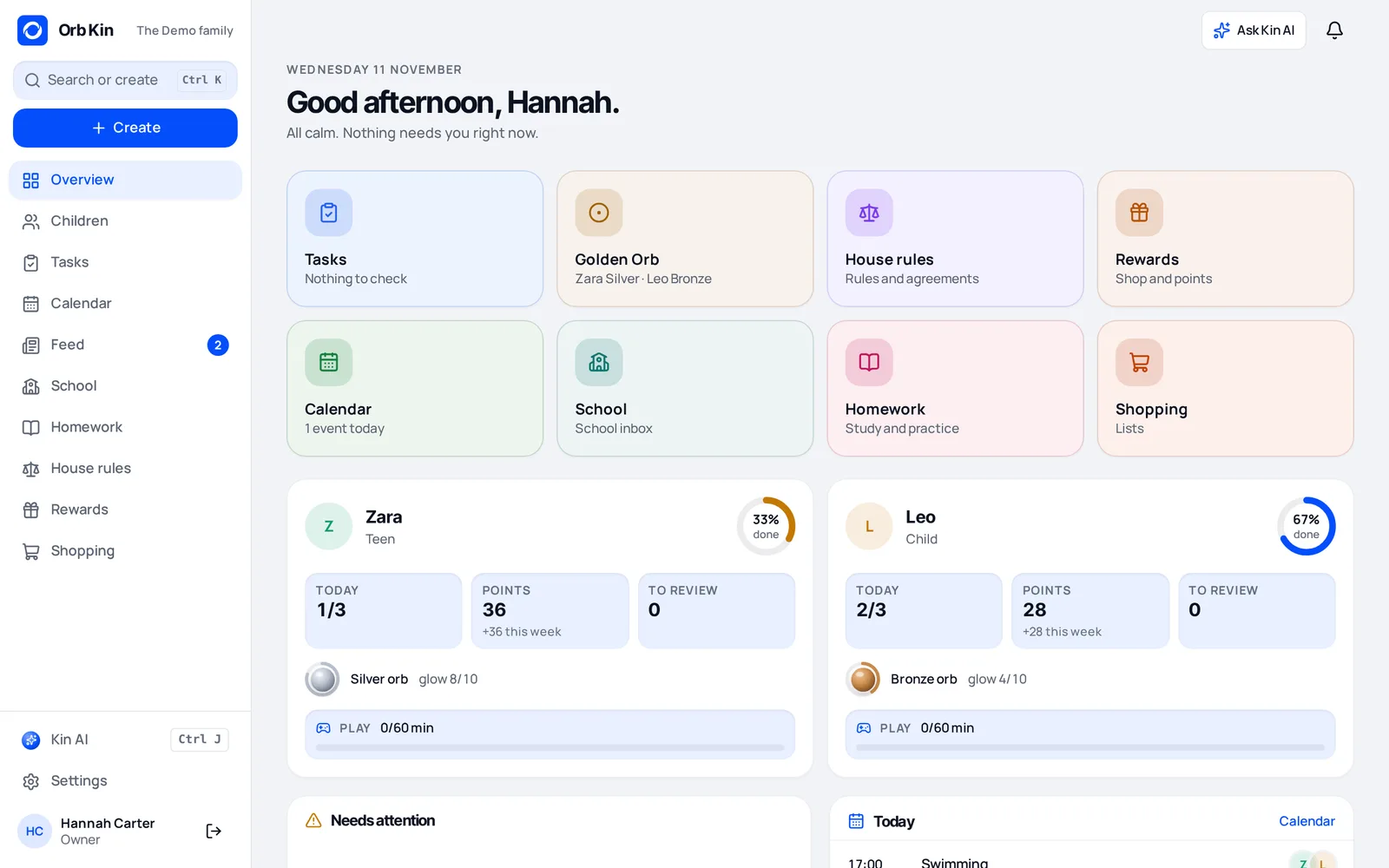
Parents see what’s waiting. Kids see their tasks and their orb. Every area has its own colourful tile, so even the youngest know where to tap.

The Orb Kin parent home: colourful tiles for tasks, the Golden Orb, house rules, rewards, calendar and school
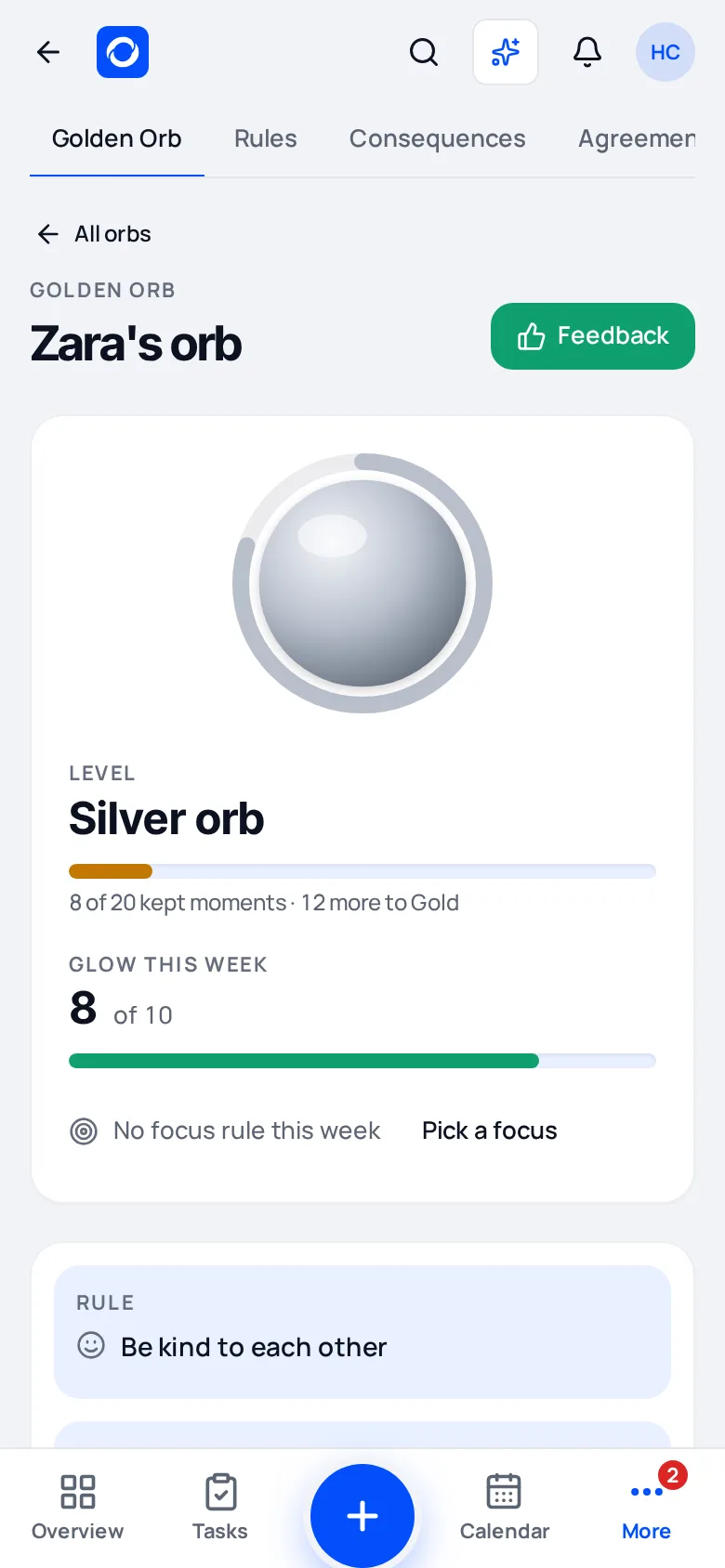
A teen’s Golden Orb on a phone, Silver level with this week’s glow
For parents

Set it up once, in two minutes

  • A guided setup suggests rules and links your tasks
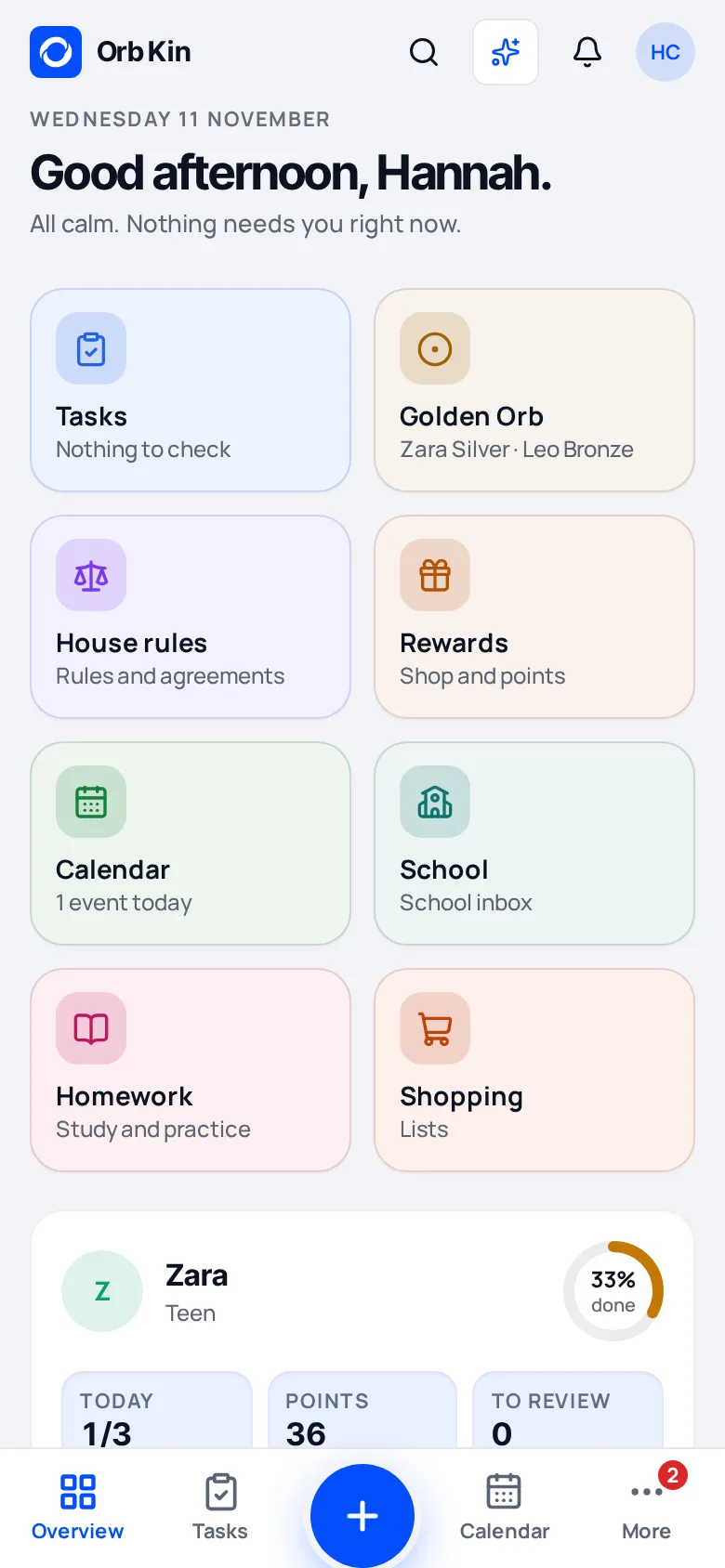
  • One home screen shows what is waiting for you
  • Change the levels and rewards to suit your family
The parent home screen on a phone
For kids and teens

See your progress, not a telling-off

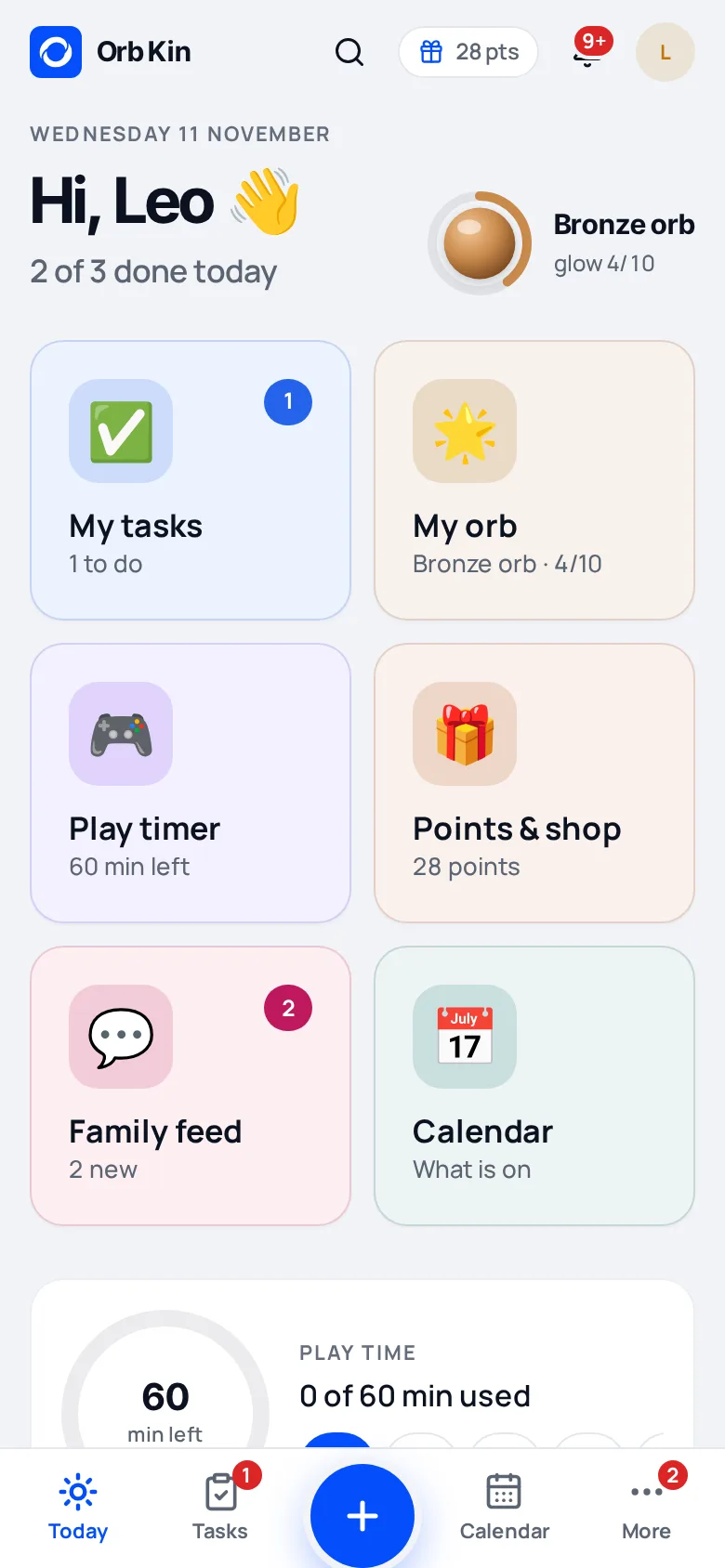
  • A big, friendly home with your tasks and your orb
  • Watch the glow fill up through the week
  • Know exactly which rewards are next
A child’s home screen with big colourful tiles
Everything in one place

The whole family, organised

Chores & homework

Due times, photo proof and points. Approve in one tap.

House rules

Agreements everyone signs up to. Teens can propose changes and appeal.

Rewards

A points shop with rewards you choose, some unlocked by orb level.

Family calendar

Events, plans and outings, with requests the kids can send you.

School inbox

Forward school emails; Orb Kin pulls out the dates and to-dos.

Screen & play timer

Screen time kids can see counting down, on your terms.

Co-parenting & carers

Share the right things with a second home, grandparents or a carer.

Shopping & feed

A shared shopping list and a family feed for the little wins.

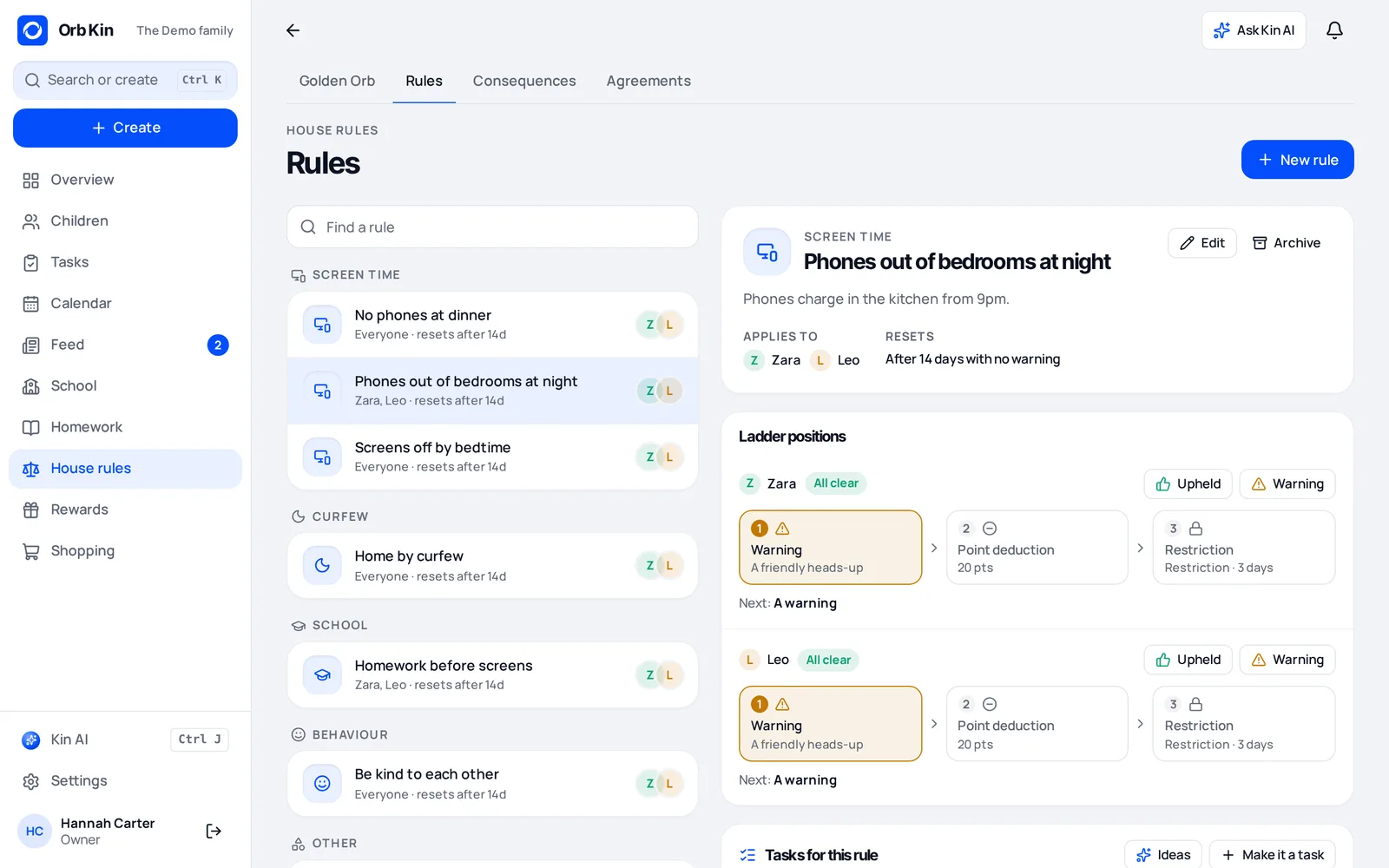
A house rule with its linked tasks and recent feedback
Rules that do something

Every rule shows its tasks, feedback and rewards

  • Link any task to the rule it supports
  • Mark a rule as kept with a short note
  • See who is on track this week at a glance
  • Appeals and proposals land in one place
Faith packs · optional

Room for what your family believes

Switch on a faith pack for ready-made tasks and holy days in your calendar. Off by default, and only your family sees it.

Islam

Daily prayersRead Qur’an for 10 minutesLearn a duaHelp prepare iftar
Ramadan, Eid al-Fitr, Eid al-Adha

Christianity

Bedtime prayerRead a Bible storyGet ready for church
Christmas, Easter

Judaism

Help set the Shabbat tableHebrew practiceTzedakah box
Rosh Hashanah, Hanukkah, Passover

Hinduism

Help with pujaLearn a shlokaMake a rangoli
Diwali, Holi, Navaratri

Sikhism

NitnemSevaLearn a shabad
Vaisakhi, Guru Nanak Gurpurab

Buddhism

Quiet sitting for 5 minutesAn act of kindnessHelp at the shrine
Vesak, Bodhi Day
Built for trust

Your family, your data, your rules

Walled-off family data

Each family’s data is kept separate. Nobody outside your family sees it.

Roles and carer areas

Parents, teens, children and carers each see what fits their role.

Audit log

Parents can see who changed what, and when.

Fair appeals

Kids and teens can ask for a decision to be looked at again.

AI on clear monthly plans

AI help comes with a set number of runs a month. No surprise bills.

Leave any time

Delete your family and everything in it from settings, whenever you like.

Pricing

Every feature on every plan

Plans differ only in how many AI runs you get each month.

Free

£0 / month

Everything you need to get going.

  • All features
  • 60 AI runs a month
  • No card needed
Start free

Plus

£4.99 / month

For busy weeks with more AI help.

  • All features
  • 400 AI runs a month
  • Same app, more AI help
Start free

Upgrade inside the app — coming soon

Family

£9.99 / month

For big families and several households.

  • All features
  • 1,500 AI runs a month
  • Same app, the most AI help
Start free

Upgrade inside the app — coming soon

Questions parents ask

Good to know

Can’t find your answer? Start free and look around — it takes two minutes.

What is Orb Kin?

Orb Kin is a family app for parents, kids and teens. You agree house rules together, set chores and homework, plan the family calendar and give feedback and rewards, all in one place. Every rule a child keeps fills their Golden Orb.

How does the Golden Orb work?

Each house rule links to tasks or homework. When a task is done on time, or a parent marks a rule as kept, the child’s orb glows a little more. Kept rules add up to levels, from Bronze to Silver, Gold and the Golden Orb, and each level unlocks rewards the family chose in advance.

Can Orb Kin help with screen time and bedtime phones?

Yes. Agree a screen time rule such as phones out of bedrooms at night or homework before screens, and use the play timer so children can see the time they have earned. Orb Kin does not lock devices; it makes the agreement clear and rewards keeping it, which takes the fight out of it.

Does it work for separated parents and two homes?

Yes. Connect the two homes and choose what to share: handovers, school news, timetables and emergency info, each shared only when both homes switch it on. Your child can be linked in both homes and switch between them in the app, while each home keeps its own rules. Grandparents and carers can get their own limited view too.

What age is Orb Kin for?

Orb Kin works from primary school age to the teenage years. Younger children sign in with a PIN and get big, colourful tiles. Teens get their own view where they can propose rule changes and appeal a decision.

Is Orb Kin free?

Yes. The Free plan includes every feature and 60 AI runs a month, with no card needed. Plus (£4.99 a month) and Family (£9.99 a month) only add more AI runs.

Is our family’s data private?

Each family’s data is kept separate and is only visible to the people in your family, according to their role. Parents can see an audit log and can delete the family and everything in it from settings at any time.

What’s new

Constantly improving, shaped by families

Orb Kin is built in small, steady steps with the families who use it. Here is what landed recently.

  • New
    The Golden OrbRules, tasks, feedback and rewards joined up, with a guided setup.
  • New
    A colourful homeOne tile per area, with a count when something is waiting.
  • Faith
    Qur’an & duas as homeworkLearning plans, calm mushaf practice and a recitation check.
  • School
    School inboxForward school emails and get the dates in your calendar.
  • Homes
    Connected households & carersShare with a second home or a carer, and switch between households.

Bring your family into one orb

Set up in a couple of minutes. Free to start, no card needed.